Digital Promenade Objective Google AI Overviews have fundamentally changed what it means to rank on...
Add Me to Search: The Complete Guide to Google People Card in 2026
Digital Promenade
Objective
This blog is a practical, step-by-step guide to Google People Card in 2026 – covering how to add yourself to Google search, create and edit your profile card, and optimize it so the right people find you when they search your name.
Key Takeaways
- Google People Card lets individuals create a personal profile that appears directly in search results when someone searches their name.
- The feature is available in India, Nigeria, Kenya, and South Africa via mobile – you need a Google account and a public name.
- Creating a People Card takes about five minutes but optimizing it properly – with the right bio, links, and keywords – can significantly improve how you appear in search.
- You can edit your People Card anytime through the same Google Search process used to create it.
- Google People Card is especially useful for freelancers, consultants, job seekers, entrepreneurs, and professionals who want to control their digital identity.
- A well-built People Card is personal branding infrastructure – it ensures that when someone looks you up, they find the right information, not a random LinkedIn or old social profile.
Introduction
If you’ve ever Googled your own name and wondered why a random forum comment from 2017 shows up before your actual professional profile, you understand why Google People Card matters.
People Card gives you a verified slot in Google Search – a place where you control what appears. Your name, your profession, your links, your bio. Not whatever the algorithm happened to index first.
For freelancers, consultants, small business owners, job seekers, and anyone building a professional reputation, this matters more than most people realize. The first thing a potential client, employer, or collaborator does is Google you. What they find shapes whether they reach out.
This guide covers everything you need to know about how to add yourself to Google Search in 2026 – from the basics of creating your People Card to how to optimize it so it actually works for your Best Digital Marketing Agency in Noida.
What Is Google People Card?
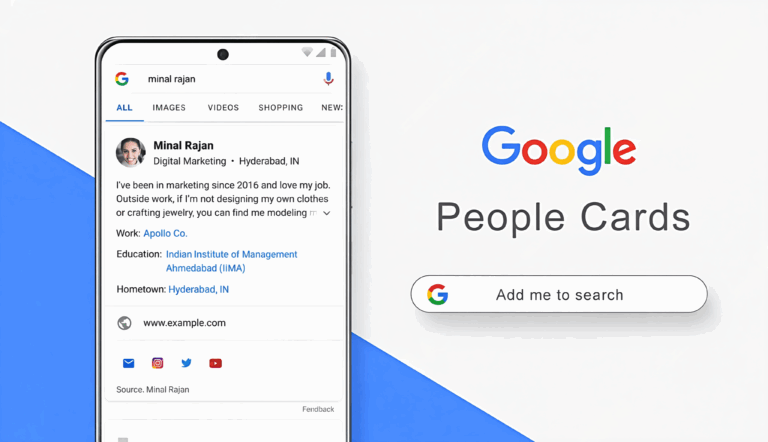
Google People Card is a feature that lets individuals create a personal profile that appears in Google Search when someone searches their name.
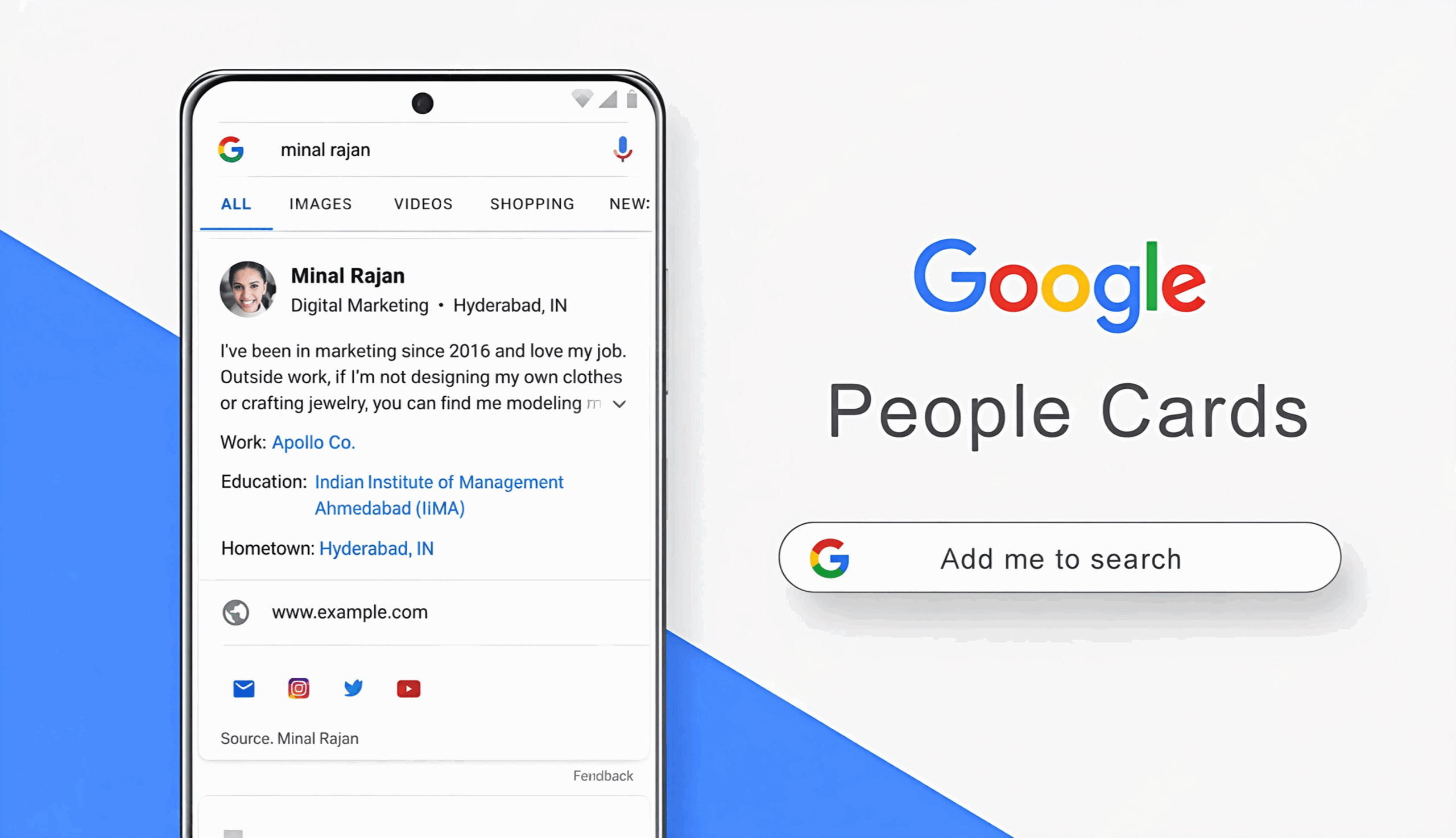
Think of it as a mini-website hosted by Google. When someone types your full name into Google, your People Card can appear at the top of results, showing your photo, a short bio, your profession, your location, and links to your social profiles or website.
It’s Google’s version of a digital business card – except it’s indexed, trusted, and visible to anyone searching your name.
Who Can Create a Google People Card?
As of 2026, Google People Card is available to users in India, Nigeria, Kenya, and South Africa. To create one, you need:
- A Google account
- A mobile device (the feature works best on mobile browsers)
- A public-facing name that people might search for
- No existing Knowledge Panel (Knowledge Panels are for public figures already documented extensively online)
If you meet these criteria, the process is straightforward. Here’s how to do it.
How to Add Yourself to Google Search: Step-by-Step
Step 1: Open Google on Your Mobile Browser
Open Google.com on your mobile browser. Make sure you’re signed into your Google account. The People Card feature is primarily mobile-first, so this works better on a phone than on a desktop.
Step 2: Search "Add Me to Search"
Type exactly this into the Google search bar: add me to search
Google will recognize this as a People Card request and show you a prompt at the top of the search results that says “Add yourself to Google Search.”
Step 3: Click "Get Started"
Tap the Get Started button. This opens the People Card creation interface directly within Google Search.
Step 4: Fill in Your Information
You’ll be asked to fill in several fields:
Name – Your full name as you want it to appear in search. Use the name people are most likely to search for.
Location – Your city or region. This helps Google match your card to local searches.
About – A short bio of up to 800 characters. This is the most important field. Write in plain language about who you are, what you do, and who you help. Avoid jargon.
Profession or Work – Your current job title or professional identity. “Freelance Graphic Designer,” “Digital Marketing Consultant,” “Chartered Accountant,” etc.
Education – Your educational background if relevant.
Hometown – Optional, but adds context.
Website – The most important link field. If you have a portfolio, personal website, or business page, this is where it goes.
Social profiles – You can link your LinkedIn, Twitter/X, Instagram, Facebook, YouTube, and other verified profiles. Add the ones that reflect your professional presence.
Step 5: Add a Photo
Add a clear, professional photo. This is the first thing someone sees. A clean headshot against a simple background works best. Avoid group photos, heavily filtered images, or anything that looks informal if you’re building a professional profile.
Step 6: Preview and Save
Review your card before publishing. Check that all information is accurate, the bio reads clearly, and the links work. Then tap Save.
Google will review your card – this usually takes a few minutes to a few hours. Once approved, your card will appear in search results when someone searches your name.
How to Edit Your People Card
Information changes. Job titles, locations, links – all of it needs updating as your career evolves. Editing your People Card is easy.
To edit your People Card:
- Open Google on your mobile browser
- Make sure you’re signed into the same Google account you used to create the card
- Search for edit my people card or simply add me to search
- Google will show your existing card with an edit option
- Tap the edit button, make your changes, and save
Changes typically go live within a few minutes after Google reviews them. Keep your card updated – an outdated People Card with old job information or a broken website link makes a worse impression than no card at all.
How to Optimize Your Google People Card
Creating the card is step one. Optimizing it is what makes it actually useful.
Write a Bio That Works for Search
Your “About” section is the most important piece of your card. It needs to do two things: tell human readers who you are clearly, and include the words people might use to search for someone like you.
If you’re a freelance content writer in Delhi, your bio should naturally include phrases like “content writer,” “freelance,” and your location. Not stuffed artificially – just written in a way that reflects how people actually search.
Good example: “I’m a freelance content writer based in Delhi with 6 years of experience writing for B2B tech and SaaS companies. I help businesses create long-form content that ranks on Google and drives qualified traffic.”
Bad example: “Content writer. Freelance. Delhi. SEO. Content marketing. Writing.”
One reads like a person. The other reads like a keyword list. Google – and the humans reading your card – prefer the first version.
Add Every Relevant Social Link
Link every professional profile that accurately represents you. LinkedIn and your personal website are the most important. Twitter/X is useful if you’re active there professionally. Instagram if your work is visual.
Don’t link profiles that are inactive, personal, or don’t represent you professionally. Each link is a signal of credibility – an empty Instagram with three posts hurts more than helps.
Choose Your Profession Description Carefully
The profession or work field on your People Card is pulled into how Google describes you in search results. Choose language that matches what people actually search for, not your internal job title.
“Head of Content” is a job title. “Content Marketing Strategist” is what people search for. Pick the latter.
Keep It Current
Review your People Card every three to six months. Job changes, new websites, updated social profiles – all of these should be reflected. A current, accurate card signals that you’re active and professional.
Why Google People Card Matters for Personal Branding in 2026
Digital identity is not optional anymore – for professionals, freelancers, or entrepreneurs.
When a recruiter considers your application, they Google you. When a potential client is deciding between two consultants, they Google both. When a journalist needs a source, they search for experts in your field.
What appears in those results shapes their decision before they’ve had a single conversation with you.
Google People Card gives you a piece of that first page. A verified, accurate, professionally presented card that you control entirely. That’s more valuable than it sounds, because the alternative is letting random, outdated, or irrelevant results define how people perceive you.
For freelancers especially, People Card functions as a free, always-on business card. Anyone searching your name can see exactly what you do, how to reach you, and where to find more of your work – without navigating away from Google.
Common Google People Card Mistakes to Avoid
Incomplete profiles. A People Card with missing fields – no photo, no website, no bio – looks abandoned. Fill everything out.
Vague bios. “I am a professional with experience in various fields” tells nobody anything. Be specific about what you do and who you help.
Broken links. Check that every link on your card works before saving. A dead link to an old website is worse than no link at all.
Outdated information. An old job title or a city you moved away from two years ago sends the wrong signal. Review your card regularly.
Ignoring the photo. The photo is the first visual impression. A blurry, unclear, or unprofessional image undermines an otherwise well-crafted card.
Google People Card and Your Broader Digital Presence
People Card is one piece of a complete digital presence – not a replacement for it.
Your website, your social profiles, your published content, and your reviews across platforms all contribute to how you appear online. People Card gives you a single, controlled touchpoint at the top of Google Search. Everything else builds the credibility behind it.
For businesses looking to manage their full digital presence SEO, reputation management, social media, and paid visibility – Digital Promenade’s digital marketing services offer a complete approach. From online reputation management to local SEO and Google My Business optimization, the full picture of how your brand appears online is worth managing properly.
Conclusion: Your Google People Card Is Your Digital First Impression
The first impression someone gets of you online is usually a Google search. People Card lets you shape that impression intentionally.
Create the card. Fill it in properly. Add a good photo. Link your real professional profiles. Write a bio that sounds like a person, not a keyword list.
Then review it every few months and keep it current.
That’s all it takes. A few minutes of setup, maintained regularly, gives you a permanent slot in Google Search that works for you around the clock.
FAQs About Google People Card
Google People Card is a personal profile feature that lets individuals create a searchable card in Google Search. When someone searches your name, your card can appear showing your photo, bio, profession, location, and links.
On mobile, open Google and search "add me to search." Follow the prompts to create your People Card, fill in your name, bio, profession, location, and links, then save.
Yes. Google People Card is available to users in India (as well as Nigeria, Kenya, and South Africa) as of 2026.
Search "edit my people card" or "add me to search" on Google while signed into your account. Your existing card will show with an edit option.
Write a clear, specific description of who you are and what you do ideally including natural keywords like your profession, location, and area of expertise. Keep it under 800 characters and write for a human reader, not a search engine.
Usually a few minutes to a few hours after saving, depending on Google's review process.
Yes. Go to your card through the same search process, find the edit option, and there is a delete option available. Once deleted, the card is removed from search results.
It doesn't directly affect your website's Google rankings, but it gives you a controlled presence in search results for your name which is valuable for personal branding, freelancers, and professionals.
People Card is designed for individuals, not businesses. Businesses should use Google Business Profile for their search presence. Digital Promenade can help optimize your Google Business Profile as part of a complete local SEO strategy.
A Knowledge Panel is generated automatically by Google for public figures with significant online presence. A People Card is created manually by the individual. Most people will use a People Card; Knowledge Panels are not something you can directly request. -e
Know Your Digital Goals

Digital Promenade Objective AI agents in SEO are not a future concept – they are...
Digital Promenade Objective To get cited in ChatGPT, Perplexity, and Google AI Overviews, build consistent...

Digital Promenade Objective A technical SEO audit checklist covers crawlability and indexing, site speed and...
Digital Promenade Objective This blog is a practical, step-by-step guide to Google People Card in...

Digital Promenade Objective This blog helps businesses in Noida and Delhi NCR understand what separates...

Digital Promenade Objective This blog explains why SEO is important for B2B companies specifically –...

Digital Promenade Objective This blog explains how SEO and social media can work as complementary...

Digital Promenade Objective This blog answers definitively whether Google reviews help SEO and explains exactly...

Digital Promenade Objective This blog gives honest, experience-backed answers to one of the most common...